“You can’t optimize what you can’t identify. Before cloud cost becomes a Finance problem, it is first a data problem.”
Introduction
One of the first things you learn when working with cloud costs is that seeing how much you spent is not the same as understanding what you spent it on. Imagine opening Azure Cost Management and discovering that your organization spent $50,000 last month, That tells you something.
But then Finance asks:
Which business unit generated this cost?
Your engineering lead asks:
Who owns the resources responsible for the increase?
And management asks:
How much are we spending on Production compared with Development?
Suddenly, knowing the total cost is not enough.
This was the challenge behind a FinOps tagging project I worked on in an enterprise Azure environment. We needed to improve the quality of the metadata attached to Azure resources so that cloud costs could be connected to applications, owners, environments, business units, and financial structures.
But there was another problem.
We didn’t want the solution to depend entirely on engineers remembering to manually add every required tag whenever they created a resource.
So we built an automated tagging approach using:
Azure Resource Groups + Azure Policy + Tag Inheritance + Remediation
The implementation eventually helped us achieve approximately 99.9% tagging coverage.
In this article, I’ll walk through the problem, the FinOps thinking behind the solution, how the architecture works, and how you can reproduce the same approach in your own Azure environment. All resource names, applications, teams, financial codes, and other examples used in this walkthrough are fictional.
The Problem Wasn’t Really Tagging
At first, this looked like a tagging problem: some resources had complete tags, some had partial tags, others had no useful tags at all.
But looking at it from a FinOps perspective changed the problem. The real issue was cloud cost data quality.
Consider this resource:
Resource: vm-prod-001Monthly Cost: $650
Azure can tell us how much that Virtual Machine costs. But from this information alone, we may not know:
Which application uses it?Who owns it?Which business unit should receive the cost?Is it Production or Development?Which financial cost center does it belong to?How critical is it?
Without that information, cost allocation becomes difficult; optimization becomes harder too.
If Azure Advisor tells us that vm-prod-001 is underutilized, someone still needs to determine who owns the VM before deciding whether it can safely be resized or shut down.
So our goal wasn’t simply:
“Get more tags.”
The actual goal was:
Create reliable business context around Azure resources so that cloud costs could be allocated, understood, and optimized.
That’s a FinOps problem.
What Is an Azure Tag?
If you’re new to Azure, a tag is simply a key-value pair attached to an Azure resource.
For example:
Environment = Production
Here: Environment is the key, Production is the value, you can attach several tags to the same resource:
ApplicationName = DemoPaymentsApplicationOwner = PlatformTeamBusinessUnit = DigitalServicesCostCenter = 410275Environment = ProductionCriticality = HighCreatedBy = CloudEngineering
Now imagine that a Storage Account costs $500 this month.
Without useful tags, we know:
Storage AccountMonthly Cost = $500
With good tagging, we can know:
Storage AccountMonthly Cost = $500Application = DemoPaymentsOwner = PlatformTeamBusiness Unit = DigitalServicesCost Center = 410275Environment = ProductionCriticality = High
The technical resource now has business context; that is where tagging becomes valuable to FinOps.
Connecting Engineering, Finance, and the Business
FinOps sits at the intersection of Engineering, Finance, and Business. Tagging can help connect those three groups.
Think about it this way:
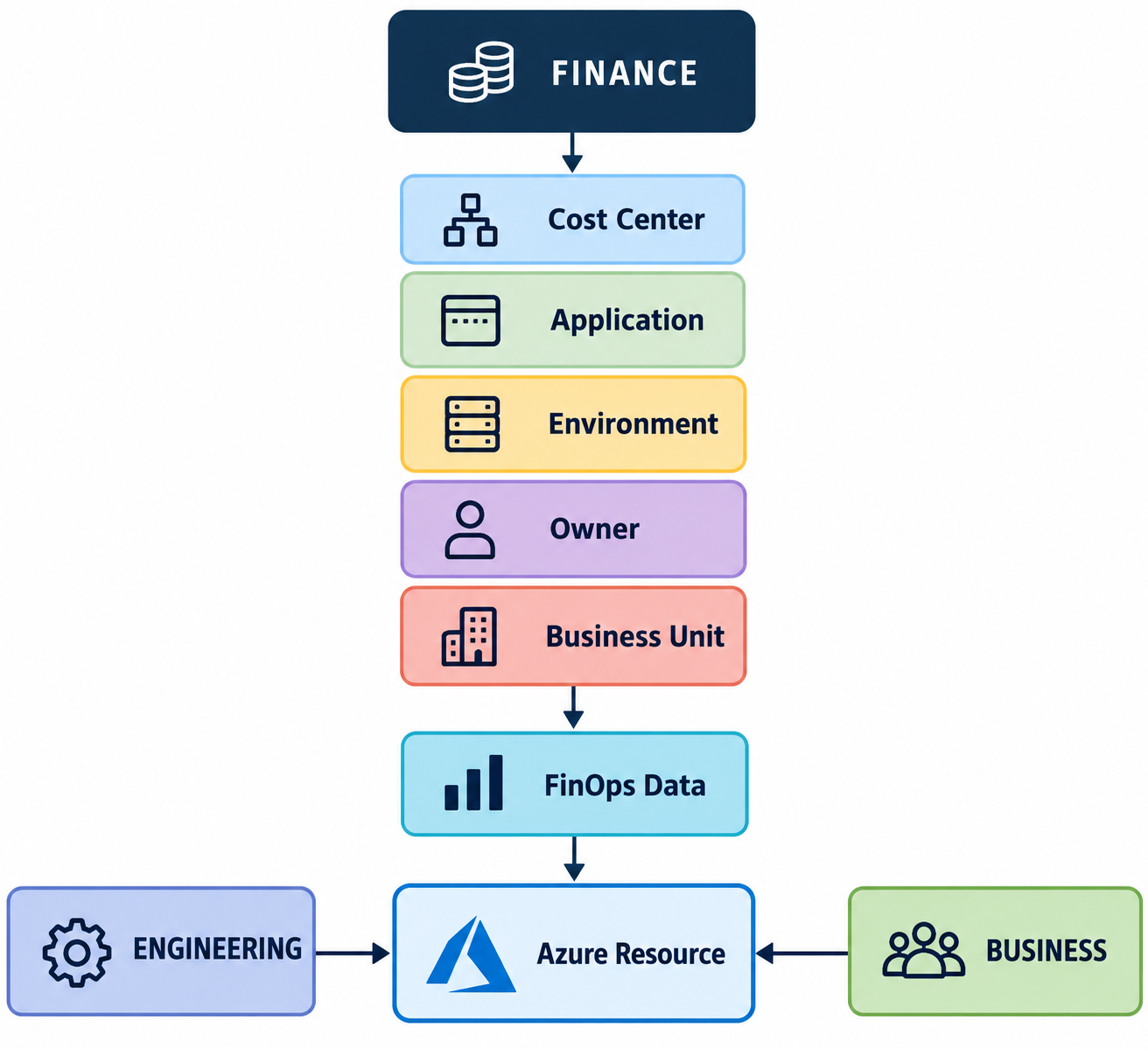
Engineering understands the infrastructure; Finance understands the financial structure. The business understands the applications and services being delivered. Good metadata creates a common language between them.
Defining the Tagging Standard
Before writing any Azure Policy, we first needed to answer a more important question:
What information do we actually need?
For this project, we worked with seven core tags.
| Tag | Purpose |
|---|---|
| CostCenter | Maps cloud expenditure to the organization’s financial structure |
| BusinessUnit | Identifies which part of the business consumes the resource |
| Environment | Identifies Production, Development, UAT, etc. |
| ApplicationOwner | Identifies who is responsible for the application |
| Criticality | Describes how important the workload is |
| ApplicationName | Connects infrastructure to the application it supports |
| CreatedBy | Identifies the person, team, or automation responsible for creation |
There is an important lesson here:
Don’t start a tagging strategy by asking how many tags you can create. Start by asking what questions your organization needs its cloud data to answer.
Every tag should have a purpose.
CostCenter deserves special attention, If you’re an engineer, you might see something like:
CostCenter = 410275
and think:
What exactly does 410275 mean?
Possibly nothing to you, but someone in Finance may immediately recognize it.
That number might identify a particular department, budget, function, or accounting structure. I like to think of it as a kind of Morse code that Finance understands.
The exact format will differ between organizations. One company might use:
410275
Another might use:
FIN-204
and another may have a completely different internal structure.
If Finance already has an established cost-center structure, your FinOps tagging model should ideally align with that existing language.
This is a good example of why FinOps is not just a cloud engineering activity. We’re connecting cloud consumption to the financial language the organization already understands.
Why Manual Tagging Wasn’t Enough
At this point, we had a tagging standard. We could simply tell every engineer:
“Whenever you create an Azure resource, remember to enter all seven tags.”
There’s just one problem. Humans aren’t great automation systems.
Someone forgets ApplicationOwner.
Another person uses:
Environment = Production
while someone else writes:
Environment = Prod
Another writes:
Environment = PROD
Someone creates an emergency resource and doesn’t tag it at all.
Over time, these small inconsistencies become a data-quality problem.
And if your FinOps reporting depends on that data, your reports become less reliable.
So we changed the question. Instead of asking:
How do we make engineers remember seven tags?
we asked:
How much of this can Azure handle automatically?
The Resource Group Gave Us an Idea
Consider a Resource Group called:
rg-finops-tagging-lab
Imagine that it contains:
Virtual MachineStorage AccountDatabaseKey VaultNetwork InterfacePrivate Endpoint
These resources may all belong to the same application and business context. If that’s true, why should an engineer repeatedly enter:
ApplicationName = DemoPaymentsApplicationOwner = PlatformTeamBusinessUnit = DigitalServicesCostCenter = 410275Environment = DevelopmentCriticality = HighCreatedBy = CloudEngineering
For every individual resource? What if we put that information on the Resource Group and allowed resources inside it to inherit the values they were missing?
That became the core design.
The Architecture
The solution looked like this:
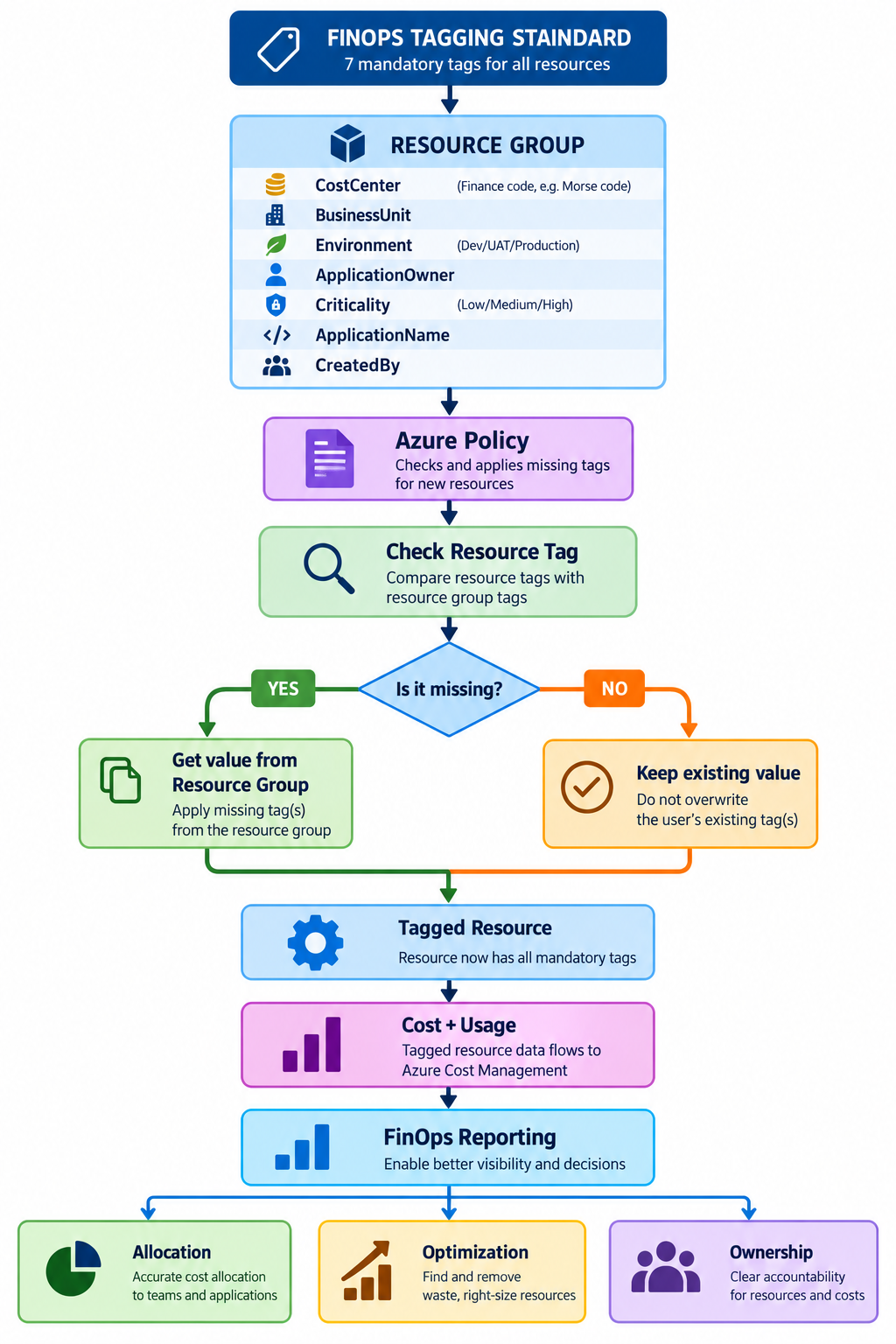
There was one design principle that mattered a lot:
Fill what is missing without blindly replacing what already exists.
We’ll come back to that.
What This Changed
The value of the solution was not just that more resources had tags. It was that the tags became more consistent and more useful for FinOps. By using Azure Policy and Resource Group inheritance, we reduced the dependence on manual tagging and improved tagging coverage to approximately 99.9%.
More importantly, we created better business context around cloud resources.
Instead of seeing only:
Resource: vm-prod-001Monthly Cost: $650
we could now connect that cost to things like:
CostCentreBusinessUnitEnvironmentApplicationOwnerCriticalityApplicationNameCreatedBy
That made cost allocation, ownership tracking, and optimization discussions much easier.
The main lesson was simple:
Good tagging is not about adding labels to resources. It is about creating reliable context around cloud consumption.
And that brings us back to the idea we started with:
You can’t optimize what you can’t identify. Before cloud cost becomes a Finance problem, it is first a data problem.
Next: The Technical Implementation
The next part will focus on how the solution was actually built, including:
Azure PolicyModify effectsManaged IdentitiesRBACResource Group inheritanceRemediationPowerShell automationSubscription and Management Group scope
That is where I’ll break down the policy logic, the scripts, and how we made sure missing tags were filled without overwriting values that engineers had already provided.
Read the Technical Implementation here: https://adedejiawolesi.com/2026/10/02/automating-azure-tagging-with-policy-managed-identity-and-resource-group-inheritance/





Leave a comment