In the first part, I focused on the FinOps problem: tagging was really a data-quality problem.
In the first part, I focused on the FinOps problem: tagging was really a data-quality problem.
The next question was:
How do we make Azure fill in missing business context automatically without overwriting values that engineers already provided?
That is what this implementation solves.
The design used:
Azure PolicyModify effectManaged IdentityRBACResource Group tag inheritancePowerShellSubscription or Management Group scope
The solution was built around one important rule:
If the resource already has a tag, keep it. If the tag is missing, Azure should supply the value.
For Resource Group inheritance, the source of that missing value is the parent Resource Group.
The Seven Tags
The tagging standard used seven mandatory tags:
CostCentreBusinessUnitEnvironmentApplicationOwnerCriticalityApplicationNameCreatedBy
Rather than building one large policy that attempted to manage all seven tags at once, each tag was handled independently.
Conceptually:
Policy 1 -> CostCentrePolicy 2 -> BusinessUnitPolicy 3 -> EnvironmentPolicy 4 -> ApplicationOwnerPolicy 5 -> CriticalityPolicy 6 -> ApplicationNamePolicy 7 -> CreatedBy
This was intentional.
If a resource already has six correct tags and is missing only one, we do not want a policy to touch the other six.
Each policy therefore has only one responsibility:
Check one tag and act only if that specific tag is missing.
The Policy Logic
Let us use Environment as an example.
The logic we wanted was:
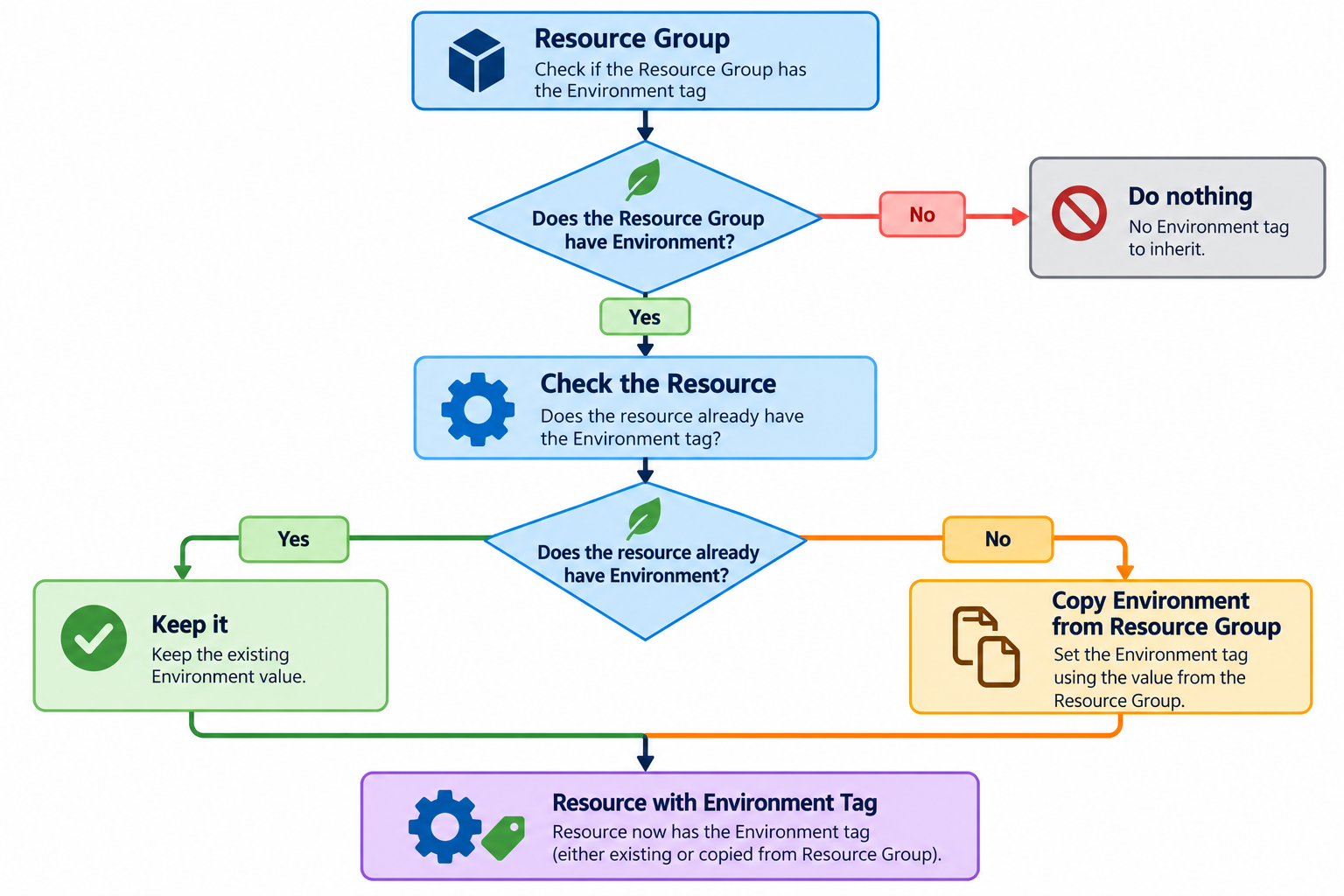
That translates into an Azure Policy rule like this:
{ "if": { "allOf": [ { "field": "type", "notEquals": "Microsoft.Resources/subscriptions/resourceGroups" }, { "value": "[resourceGroup().tags['Environment']]", "notEquals": "" }, { "field": "tags['Environment']", "exists": "false" } ] }, "then": { "effect": "modify", "details": { "roleDefinitionIds": [ "/providers/Microsoft.Authorization/roleDefinitions/4a9ae827-6dc8-4573-8ac7-8239d42aa03f" ], "operations": [ { "operation": "addOrReplace", "field": "tags['Environment']", "value": "[resourceGroup().tags['Environment']]" } ] } }}
Let us break that down.
Do Not Target Resource Groups Themselves
{ "field": "type", "notEquals": "Microsoft.Resources/subscriptions/resourceGroups"}
The policy is intended for resources inside Resource Groups.
We do not want the policy trying to modify the Resource Group itself.
So this simply says:
Evaluate resources, but not Resource Groups.
2. Check That the Resource Group Has the Tag
{ "value": "[resourceGroup().tags['Environment']]", "notEquals": ""}
This asks:
Does the parent Resource Group actually contain an
Environmentvalue?
For example:
Resource GroupEnvironment = UAT
If the Resource Group has no Environment tag, there is nothing useful to inherit.
So the policy does nothing.
This prevents Azure from attempting to copy an empty value.
3. Check Whether the Resource Is Missing the Tag
{ "field": "tags['Environment']", "exists": "false"}
This was the most important condition.
It means:
Only act when the resource does not already have this tag.
Suppose the Resource Group says:
Environment = UAT
but an engineer creates a resource with:
Environment = Production
Because Environment already exists on the resource, the policy condition becomes false.
The value remains:
Environment = Production
The Resource Group is therefore used as a fallback source, not as a forced override.
Why the Effect Is modify
The next part is:
"effect": "modify"
Azure Policy supports several effects such as:
auditdenymodifydeployIfNotExists
For this problem, modify was the right fit because Azure needed to change the resource request by adding a missing tag.
Conceptually:
Resource submitted | vEnvironment missing | vAzure Policy modifies request | vEnvironment = value from RG
If we had used:
audit
Azure would only report that the tag was missing.
If we had used:
deny
Azure could block the deployment. But the objective was to help fill the gap automatically.
So:
modify
was more appropriate.
The addOrReplace Operation
Inside the modify effect, we use:
{ "operation": "addOrReplace", "field": "tags['Environment']", "value": "[resourceGroup().tags['Environment']]"}
At first, addOrReplace may sound dangerous. After all, the goal is not to overwrite user-provided values. The protection comes from the earlier condition:
"exists": "false"
The operation only runs if the tag does not already exist.
So practically:
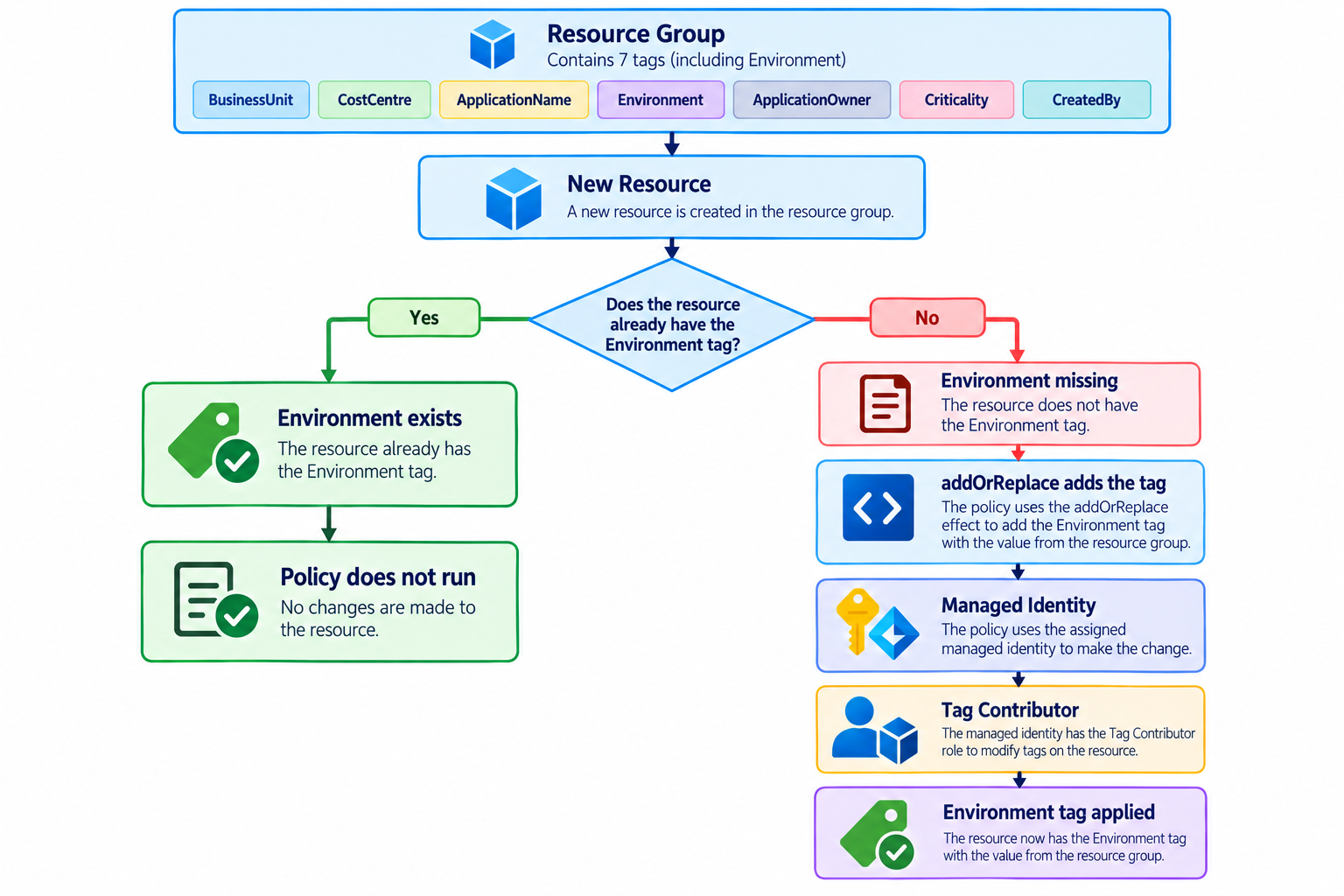
This allows us to use the modify operation safely.
Why We Needed Managed Identity
This is where the solution becomes more interesting.
Azure Policy can detect that a resource is missing a tag.
But detecting something and having permission to change it are two different things.
Think about it like this:
Azure Policy:"This resource is missing CostCentre."Azure:"Okay. Who are you?"Azure Policy:"I need permission to modify it."
The policy assignment therefore gets a system-assigned managed identity.
When we create the assignment, we use:
--mi-system-assigned
That gives the policy assignment its own Azure identity.
Conceptually:
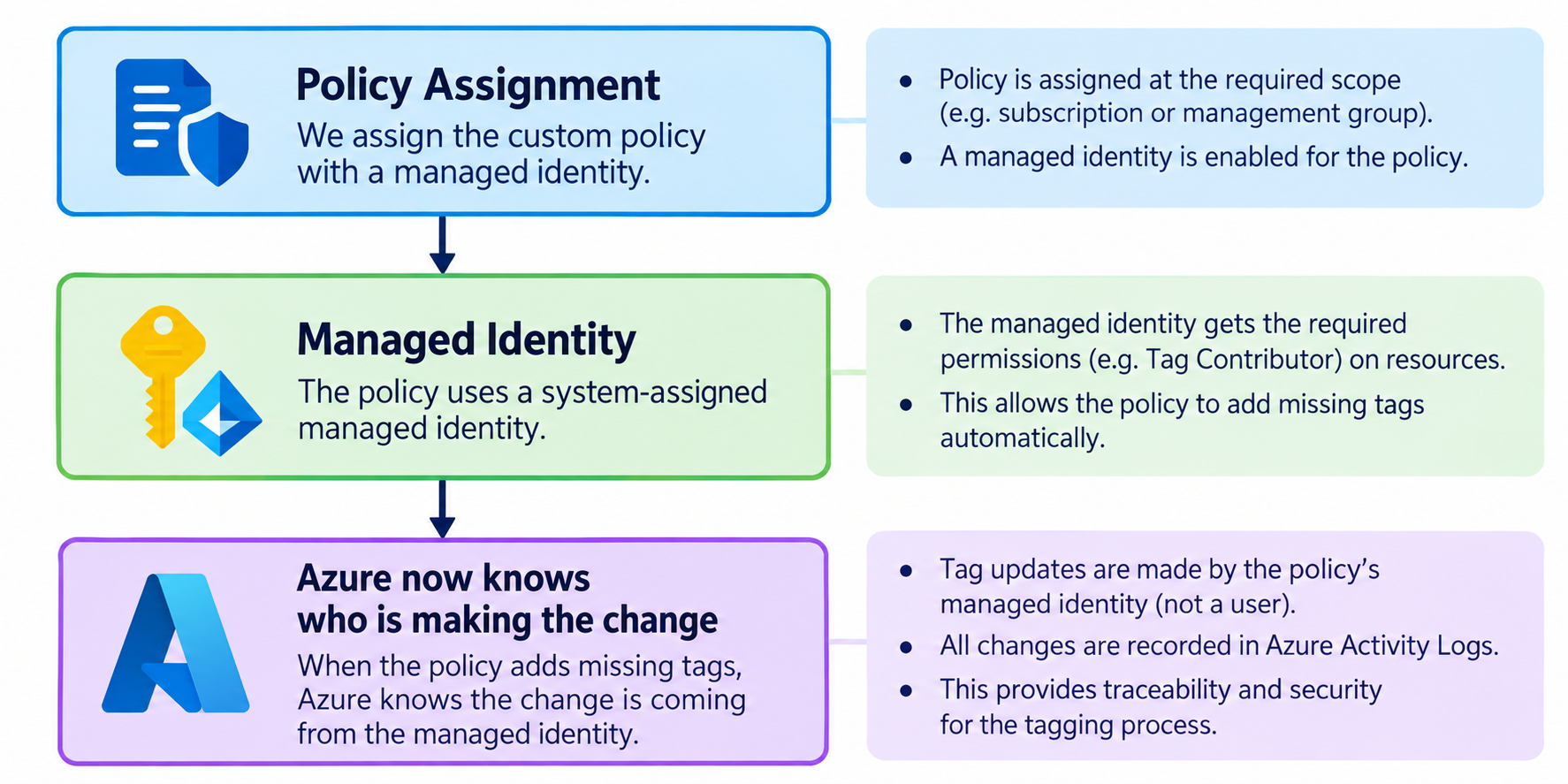
The managed identity is not my personal account.
It is Azure Policy’s own identity.
Managed Identity Still Needs Permission
Creating an identity is only half of the problem.
An identity can exist without having permission to do anything.
So we also assign the built-in:
Tag Contributor
role.
The role assignment looks like:
az role assignment create ` --assignee-object-id $PrincipalId ` --assignee-principal-type ServicePrincipal ` --role "Tag Contributor" ` --scope $Scope
This gives the policy identity permission to work with tags at the selected scope.
The full relationship becomes:
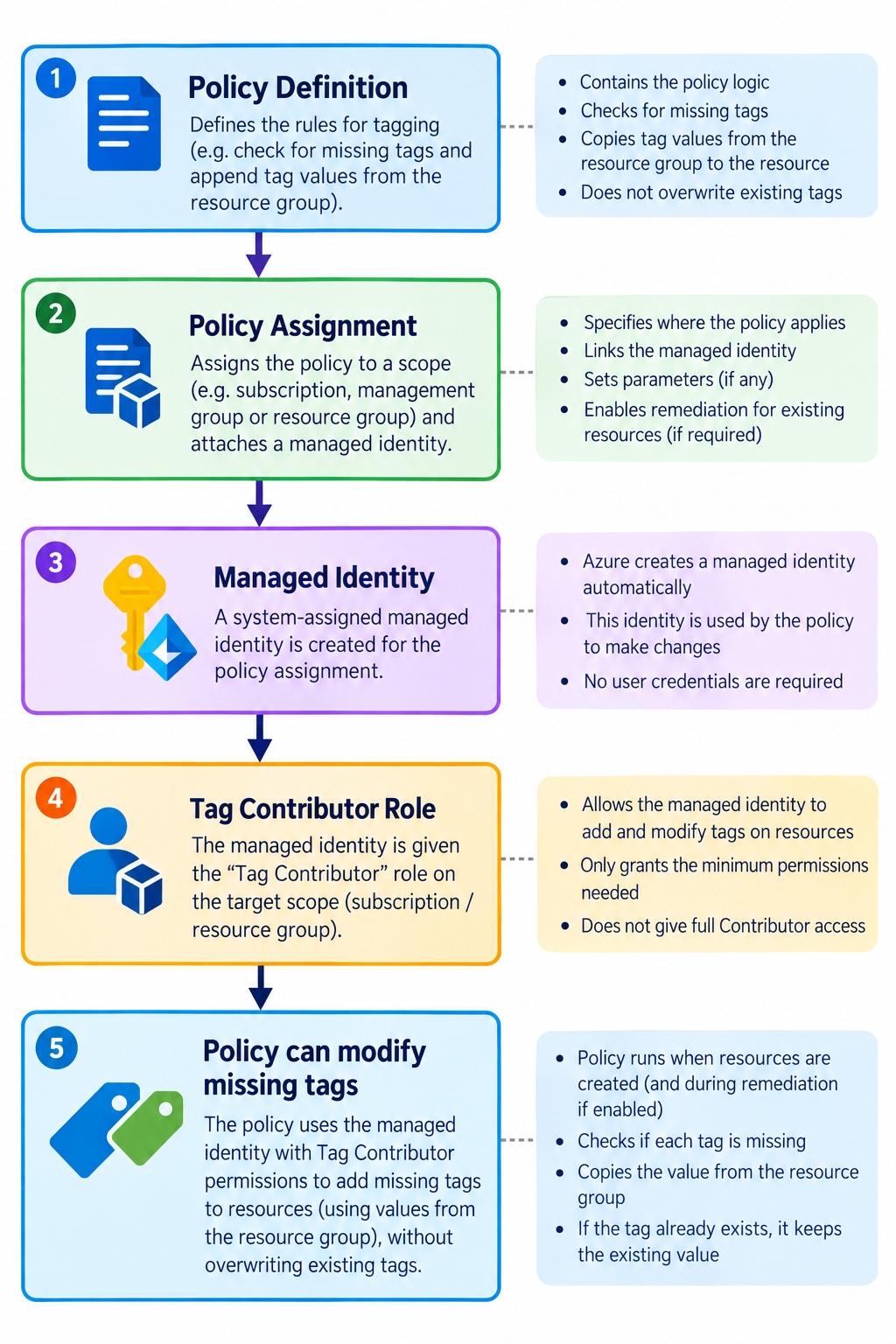
A simple way to think about it is:
Policy Definition = rulebookPolicy Assignment = where the rule appliesManaged Identity = identity cardRBAC Role = permission on that identity card
Automating the Deployment with PowerShell
Creating one policy manually is manageable.
Creating seven definitions, seven assignments, seven managed identities, and the required RBAC permissions becomes repetitive.
So PowerShell was used to automate the deployment.
The first thing the script defines is the mandatory tag list:
$MandatoryTags = @( "CostCentre", "BusinessUnit", "Environment", "ApplicationOwner", "Criticality", "ApplicationName", "CreatedBy")
Then we loop through the list:
foreach ($TagName in $MandatoryTags) {
Without the loop, we would have to write almost the same deployment logic seven times.
Building the Policy Dynamically
Inside the loop, the tag name changes automatically.
For example:
$TagName = "Environment"
produces:
wema-inherit-environment-from-rg-if-missing
while:
$TagName = "CostCentre"
produces:
wema-inherit-costcentre-from-rg-if-missing
The same template is therefore reused across all seven tags.
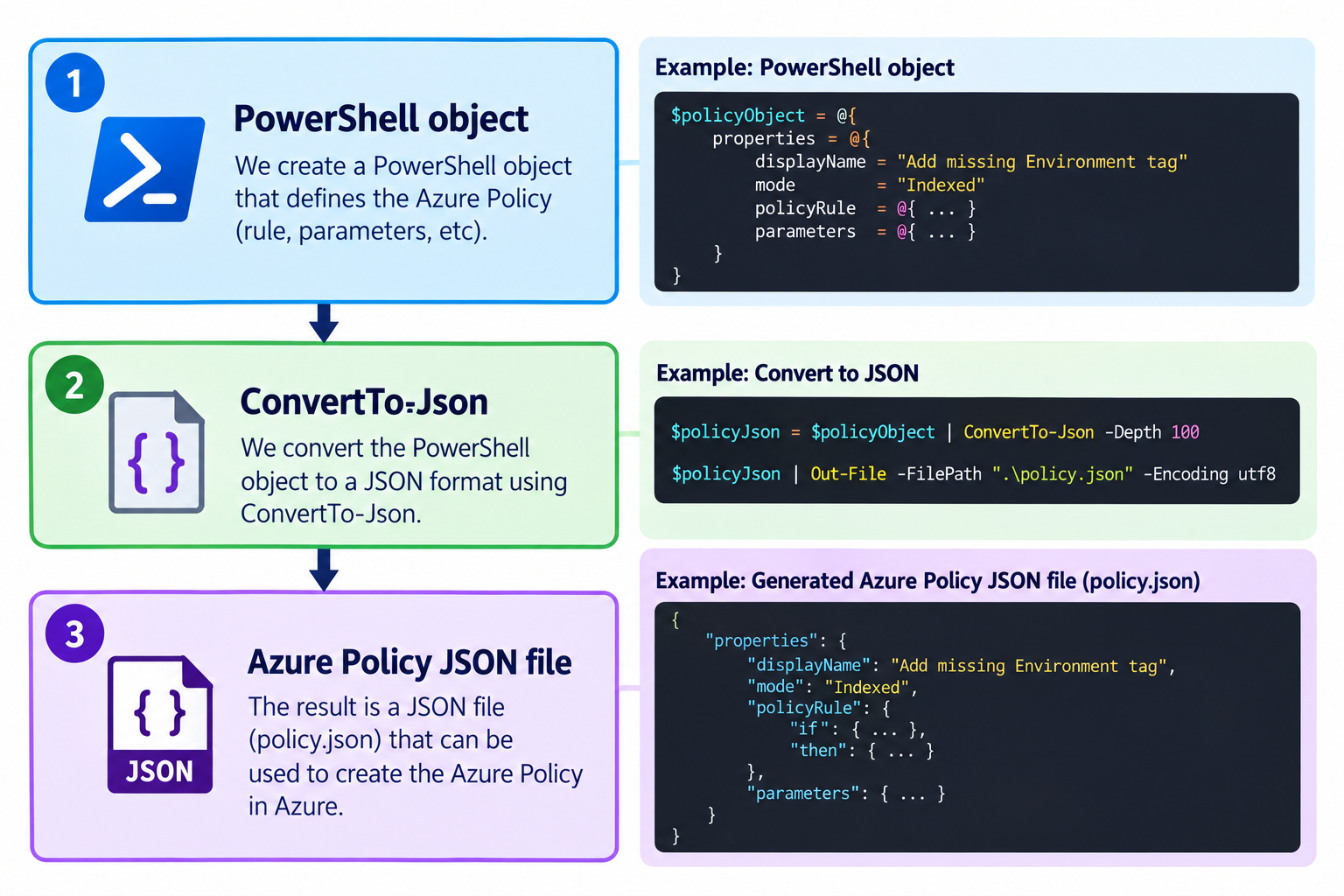
The policy rule is built as a PowerShell object:
$PolicyRule = @{ if = @{ allOf = @( @{ field = "type" notEquals = "Microsoft.Resources/subscriptions/resourceGroups" }, @{ value = "[resourceGroup().tags['$TagName']]" notEquals = "" }, @{ field = "tags['$TagName']" exists = "false" } ) } then = @{ effect = "modify" details = @{ roleDefinitionIds = @( $TagContributorRoleId ) operations = @( @{ operation = "addOrReplace" field = "tags['$TagName']" value = "[resourceGroup().tags['$TagName']]" } ) } }}
PowerShell then converts that object to JSON:
$PolicyRule | ConvertTo-Json -Depth 20 | Set-Content $RuleFile -Encoding UTF8
So:
Creating the Policy Definition
The script then creates the Azure Policy definition:
az policy definition create ` --name $PolicyName ` --display-name $PolicyDisplayName ` --subscription $SubscriptionId ` --mode Indexed ` --rules $RuleFile
Here:
Policy definition=the rule itself
For example:
If
Environmentis missing, inherit it from the Resource Group.
At this point, however, the policy is still only a definition.
It exists, but it has not been applied anywhere yet.
Creating the Policy Assignment
Next:
az policy assignment create ` --name $AssignmentName ` --scope $Scope ` --policy $PolicyDefinitionId ` --mi-system-assigned ` --location $Location
The assignment tells Azure:
Apply this policy at this scope.
The same script was designed to support either:
Subscription
or:
Management Group
scope.
At subscription level:
$Scope = "/subscriptions/$SubscriptionId"
At Management Group level:
$Scope ="/providers/Microsoft.Management/managementGroups/$ManagementGroupId"
This means the same deployment pattern can later be reused across a larger Azure estate.
Subscription vs Management Group
The script includes:
$TargetScopeType = "Subscription"
or:
$TargetScopeType = "ManagementGroup"
This changes where the definitions and assignments are created.
At subscription scope:
Subscription | +-- Resource Group A +-- Resource Group B +-- Resource Group C
the policy applies only to that subscription.
At Management Group scope:
Management Group | +-- Subscription A | +-- Subscription B | +-- Subscription C
the same governance model can be inherited by child subscriptions.
That is useful when the tagging standard needs to scale across a larger organization.
Testing the Policy
The test Resource Group had these values:
CostCentre = CC9999BusinessUnit = RetailBankingEnvironment = UATApplicationOwner = DigitalTeamCriticality = HighApplicationName = WemaMobileCreatedBy = CloudTeam
Then a resource was created with:
Environment = ProductionApplicationName = PaymentsAPICriticality = Medium
The resource deliberately did not include:
CostCentreBusinessUnitApplicationOwnerCreatedBy
After Azure Policy evaluated the deployment, the final resource tags were:
ApplicationName = PaymentsAPIApplicationOwner = DigitalTeamBusinessUnit = RetailBankingCostCentre = CC9999CreatedBy = CloudTeamCriticality = MediumEnvironment = Production
This confirmed both sides of the design.
Values supplied by the resource owner were preserved:
Environment = ProductionApplicationName = PaymentsAPICriticality = Medium
Missing values were inherited:
CostCentre = CC9999BusinessUnit = RetailBankingApplicationOwner = DigitalTeamCreatedBy = CloudTeam
Exactly what we wanted.
What About Existing Resources?
The modify effect works naturally during resource creation and update.
But an existing resource does not suddenly receive the missing tags simply because a new policy definition exists.
That is where remediation comes in.
The flow becomes:
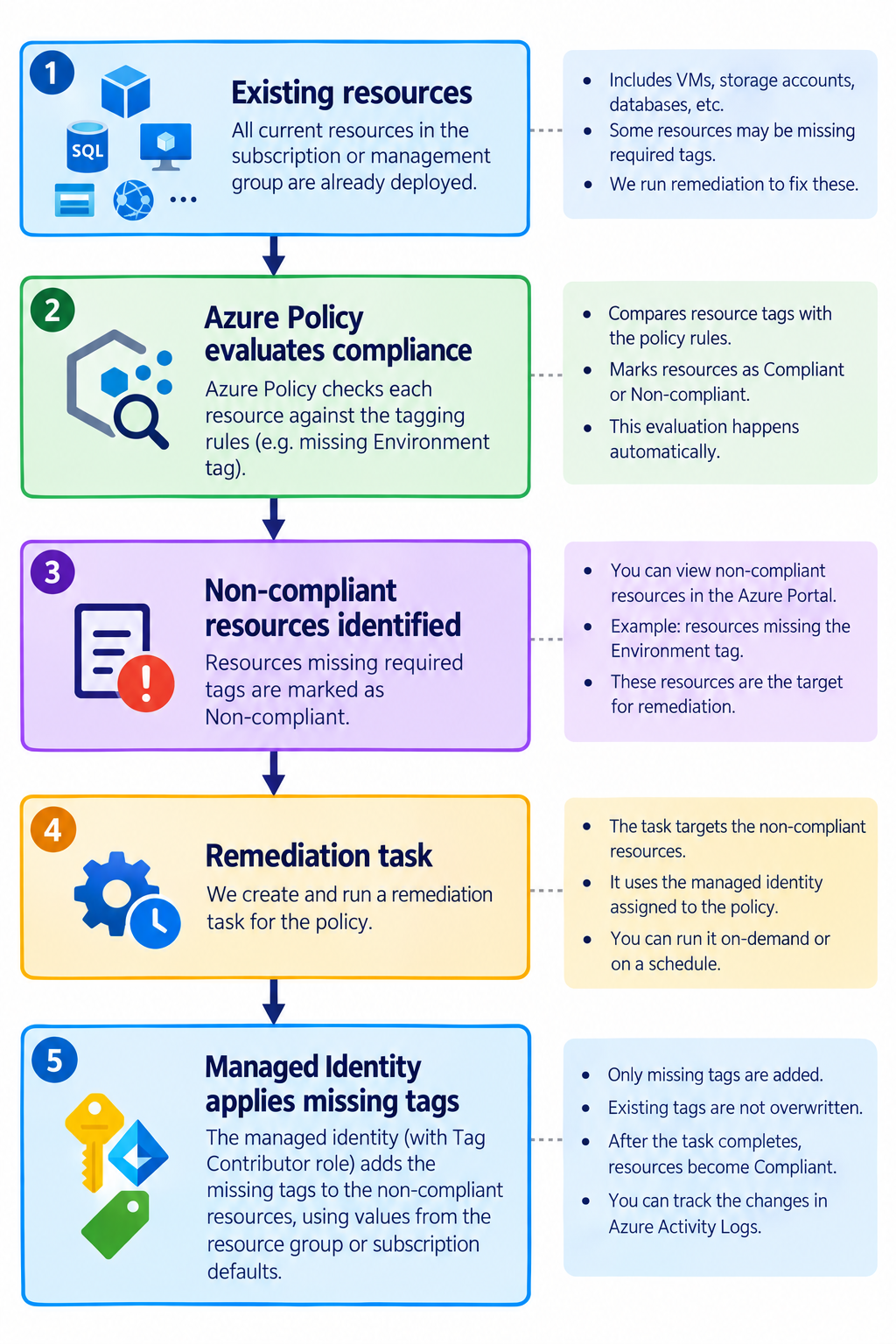
So there are really two parts to the rollout:
New resources→ policy handles them during deploymentExisting resources→ remediation brings them into compliance
This distinction is important when applying the solution to an existing enterprise environment.
The Final Architecture
The technical flow can be summarized like this:
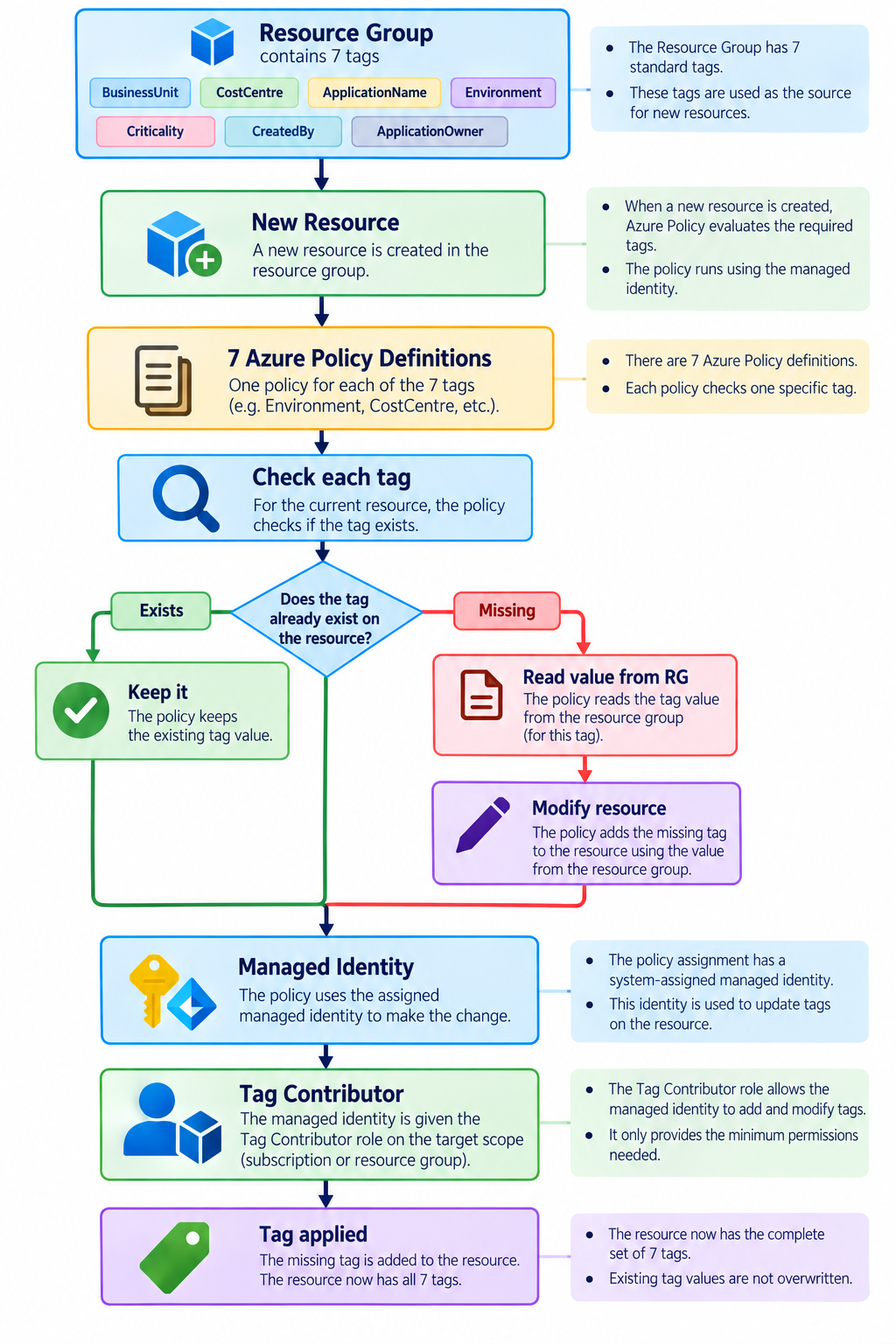
The key point is that Resource Group inheritance is used as a fallback, not as a forced overwrite.
Summary
There was nothing particularly complex about any single piece of this solution.
The value came from combining several Azure capabilities correctly:
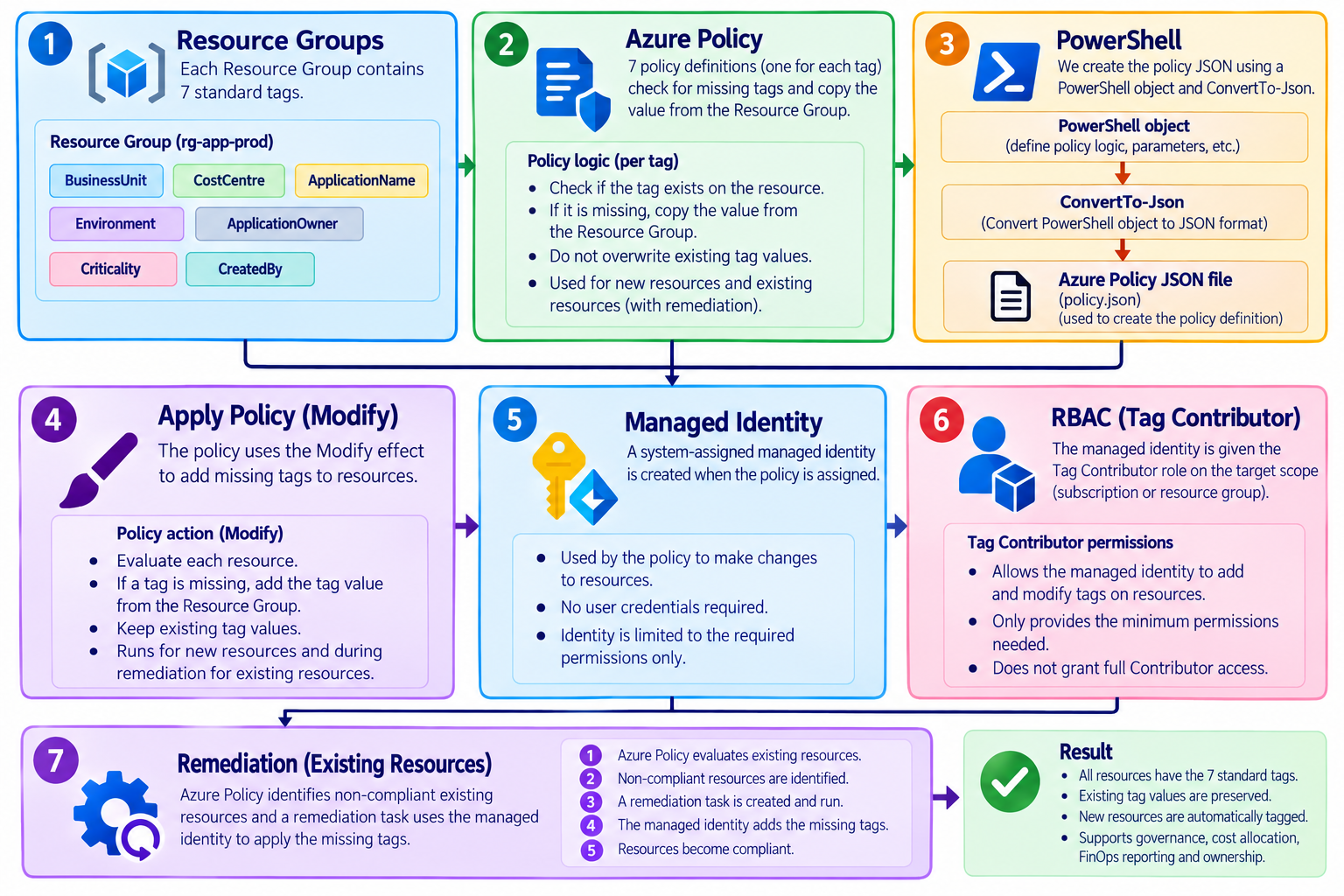
The end result was a tagging model that could scale without requiring engineers to manually fill every metadata field every time they created a resource.
More importantly, it maintained the principle that started the whole design:
Automate the missing context without destroying the context that is already correct.
That is what made the policy useful for FinOps rather than simply another enforcement mechanism.







Leave a comment